
4 Best CapCut Alternatives in 2026 (1k+ Reddit/G2 Reviews)
We analyzed over 1,000 user reviews across Reddit and G2 to find the true best CapCut alternatives for 2026. Discover which AI video editor actually wins.

If you're weighing CapCut against alternatives, you're probably looking for something more reliable than marketing pages: what real users say once exports fail, paywalls appear, or workflows get serious — and for a head-to-head against a specific challenger, our Sparki vs CapCut comparison covers the reference-based editing model in depth.
Here's the one thing that makes this comparison oddly difficult: CapCut doesn't have an official product page (listing) on G2. So there isn't a canonical "G2 star rating" you can use as a shortcut for trust, stability, or long-term workflow fit.
That's why this guide takes the practical route people expect third-party review platforms to provide: we read what users actually complain about and praise, then convert those patterns into a consistent scorecard.
To keep this comparison practical rather than subjective, we analyzed 1,015 pieces of real user feedback (Reddit discussions plus G2 reviews where available) and tagged each concrete pain point or compliment into five decision dimensions: Editing, AI, Performance/Export, Workflow, and Pricing/Value.
The result is a side-by-side comparison you can use to decide whether to stay with CapCut—or what to switch to—without pretending CapCut has a G2 rating it doesn't.
How to use this guide:
-
If you want the fastest answer, start with the scorecard table below.
-
If your main concern is failed renders or unreliable exports, jump to Performance & Export.
-
If you're trying to pick the right replacement quickly, go to "Which CapCut alternative is best for you?" near the end.
1. CapCut vs alternatives: review scorecard (Reddit + G2)
CapCut isn't listed on G2, so there isn't a canonical star rating to reference. The scorecard below is not "CapCut's G2 rating."
Instead, we built a consistent comparison from real user feedback across CapCut and its alternatives: Reddit discussions plus G2 reviews where available. We then apply the same tagging and scoring process across every tool so the five dimensions remain comparable.
What these scores mean
We convert qualitative feedback into five decision dimensions—Editing, AI, Performance/Export, Workflow, Pricing/Value —so you can compare tools on the factors that actually trigger switching (export reliability and pricing backlash show up repeatedly).
Method (simple and consistent)
We tagged each concrete pain point or praise into one of five dimensions, assigned a 1–5 sentiment score per tagged mention, and then aggregated weighted averages per tool.
Dataset size (feedback count)
-
CapCut: 257
-
Descript: 500
-
VEED.io: 170
-
Vizard: 60
-
OpusClip: 28
Here is the summary of average scores (1–5) from real users:
| Tool | Feedback | Editing | AI | Performance/Export | Workflow | Pricing/Value |
|---|---|---|---|---|---|---|
| CapCut | 257 | 2.63 | 2.58 | 1.61 | 2.33 | 1.24 |
| Descript | 500 | 4.1 | 4.2 | 2.79 | 4.41 | 3.37 |
| VEED.io | 170 | 4.13 | 4.07 | 3.11 | 4.34 | 3.08 |
| Vizard | 60 | 4.17 | 4.64 | 3.15 | 4.75 | 3.33 |
| OpusClip | 28 | 2 | 3.27 | 1.4 | 3 | 1.92 |
Note: "Feedback" counts combine Reddit mentions and G2 reviews where available; coverage varies by tool.
Across all five tools, the weighted industry averages look like this:
-
Editing experience: 3.68 / 5
-
AI capabilities: 3.77 / 5
-
Performance & export: 2.53 / 5 (weakest dimension)
-
Workflow efficiency: 3.85 / 5
-
Pricing & value: 2.74 / 5
In other words: AI video editors are getting better at features, but still struggle with reliability, exports, and perceived fairness in pricing.
What the radar chart makes obvious:
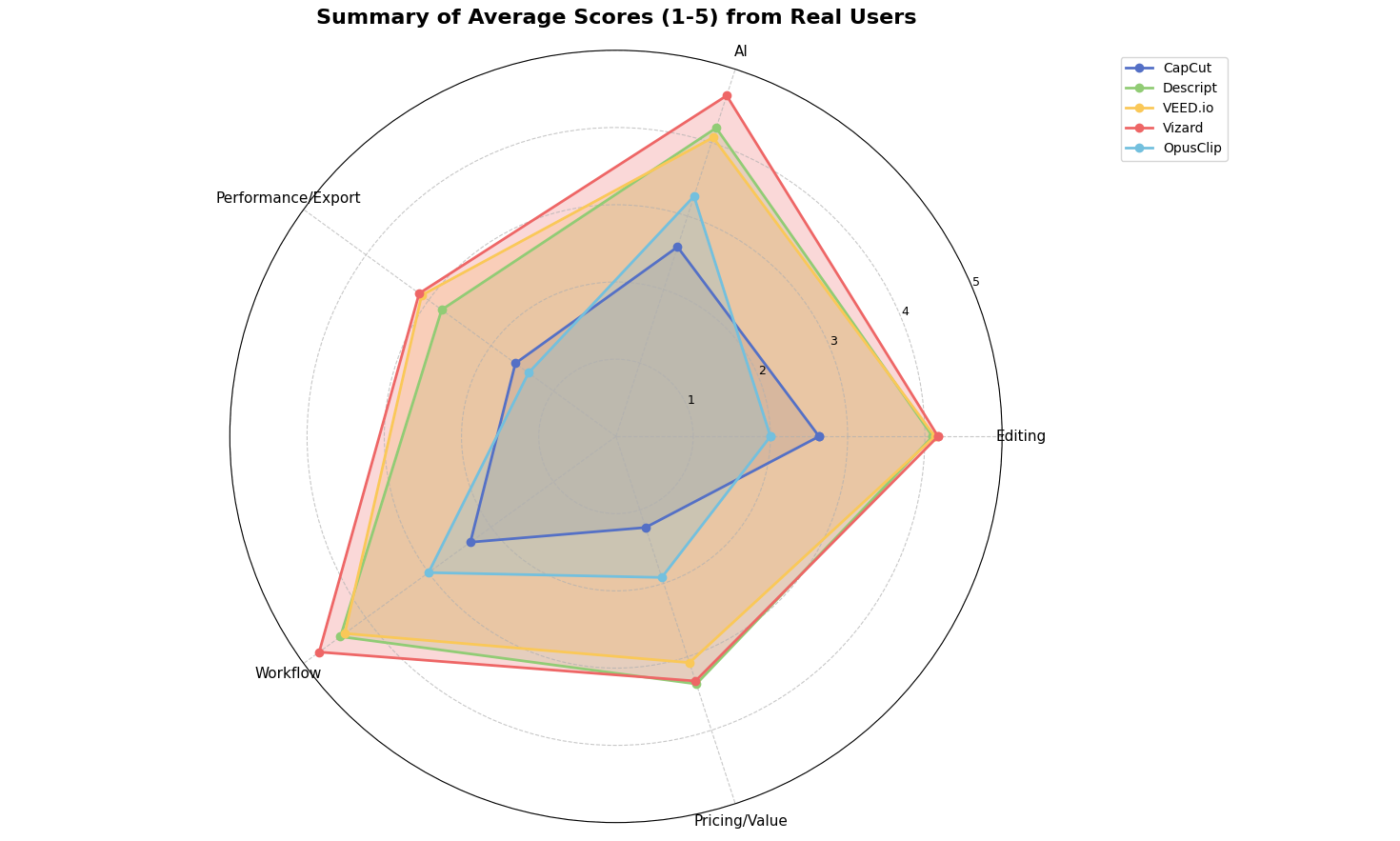
Radar chart visualizing weighted average scores (1–5) across five dimensions—Editing, AI Capabilities, Performance & Export, Workflow Efficiency, and Pricing/Value—for five major CapCut alternatives based on 1,015 real user reviews from G2 and Reddit in 2025.
What the radar chart makes obvious:
-
CapCut's biggest gap isn't features—it's reliability and perceived value (Performance/Export + Pricing/Value collapse).
-
Vizard is the clear outlier on AI and Workflow, which matches the "repurpose long video into shorts" positioning.
-
Descript and VEED.io are the most balanced options overall, but Performance/Export remains the weakest dimension across the category.
Now let's unpack what creators are actually saying, dimension by dimension.
2. What 1,015 real users reveal: the five real pain points
What Reddit users complain about most (CapCut)
Across Reddit discussions, the recurring CapCut frustrations cluster into a few themes:
-
Export or rendering becomes unreliable (or blocked at the last step).
-
"Free" workflows erode over time as useful features move behind Pro.
-
Login/account states create friction (being forced to sign in, inconsistent device behavior).
-
Frequent UI changes make simple actions harder to find.
-
People feel the tool is optimized for growth and monetization rather than stability.
2.1 Editing experience: simple interfaces still win — until they're broken
CapCut built its success on being "the easy editor." Yet in our dataset it scores only 2.63/5 on editing experience. Common patterns from CapCut feedback:
-
Basic operations removed or locked: "CapCut used to be solid but now they paywall every useful feature.."
-
The tool is "no longer easy to use" for non-paying users.
-
Frequent UI changes make it harder to find simple options like text fades or transitions.
By contrast, VEED.io, Vizard, and Descript all sit above 4.0/5 on editing experience:
-
Descript users highlight "The ease with which I can do the editing."
-
VEED.io users call it "intuitive even if you're not a video editor by trade."
-
Vizard reviewers like that it turns long recordings into clips with minimal manual work.
At the other end of the spectrum, OpusClip lands at 2.0/5 with feedback such as "really bad service, can't upload so slow."
Takeaway: creators aren't looking for "another Premiere Pro."
They want editors that feel obvious, stable, and forgiving—especially when they only have a few hours a week to produce content.
2.2 AI capabilities: impressive, but still fragmented
AI is the headline feature in almost every CapCut competitor: auto-captions, clip generation, AI voices, filler-word removal. Across tools, AI capabilities average 3.77/5—good, but far from "solved."
Patterns we see:
-
Descript (4.2/5) is praised for speech-to-text and language tools—"The translation feature is truly impressive!"—but still requires review and cleanup.
-
VEED.io and Vizard score above 4.0/5. A Vizard user writes: "I love Vizard's AI-powered clipping that turns long videos into viral shorts effortlessly."
-
CapCut's AI scores lower at 2.58/5. Users mention that newer AI features feel bolted on, while core tools are restricted or moved behind Pro.
-
OpusClip feedback is polarized: some love automation, others struggle with quality and control.
Two structural issues cut across these "AI video editor" tools:
-
AI is scattered across buttons and menus. Users still have to learn when to click which feature and how to fix mistakes.
-
AI doesn't own the workflow. It helps with a step (captions, clipping) but doesn't manage the full edit end-to-end.
So while many tools now position themselves as AI video editors, most are still traditional editors with AI add-ons.
2.3 Performance & export: the oldest pain point in video editing
This is where the entire category struggles. Across tools, Performance & export averages only 2.53/5. For CapCut and OpusClip, it's worse:CapCut: 1.61/5
-
Export blocked unless logged in or subscribed.
-
Hidden workarounds where you must dig into draft folders for rendered files.
-
Feedback warning: "DO NOT SIGN IN! (Some people said you can stay logged in so try for yourself)"
OpusClip: 1.40/5
why is the exported quality so low?
- Complaints about render speed and reliability.
Even Descript, VEED.io, and Vizard—while performing relatively better—attract recurring concerns:
-
Slow exporting of longer recordings
-
Browser-based editors struggling with large files
-
Occasional crashes that wipe edits or desync audio/video
For a creator on a deadline, "export failed" effectively equals "tool failed." It's no surprise that many people comparing CapCut alternatives mention export stability first.
2.4 Workflow efficiency: too many steps, too many tools
On paper, workflow scores look decent—3.85/5 across tools. But qualitative feedback tells a different story:
-
Users of Descript and VEED praise doing a lot in one place, yet still need other tools for B-roll, thumbnails, or final tweaks.
-
Vizard is loved for repurposing long videos into shorts, but it doesn't replace a full editor.
-
CapCut's workflow score (2.33/5) reflects how updates add friction: extra clicks, confusing project states, and formerly simple actions becoming constrained.
Underneath, the same structural problem appears again and again:
These tools reduce friction for individual steps, but you still have to be the person who plans and drives the workflow.
AI helps with isolated tasks, but doesn't orchestrate the job end-to-end.
2.5 Pricing & value: subscription fatigue and paywall backlash
Pricing & value averages 2.74/5—dragged down heavily by CapCut and OpusClip.CapCut's pricing/value is just 1.24/5. The sentiment is sharp:
-
Formerly free features are now Pro-only.
-
Paywalls appear at the export stage.
-
Some users explicitly say the model "pushes people toward piracy."
OpusClip (1.92/5) faces a related frustration: "Is there any free clipping software I can use?"—indicating users don't see enough value for the subscription.
Descript, VEED.io, and Vizard land around 3.1–3.4. Users accept these are professional tools, but still complain about:
-
Confusing plan limits
-
Hard-to-predict charges based on minutes or credits
-
Paying for many features they never touch
For anyone building a CapCut alternative, this is both warning and opportunity: creators will pay when the tool clearly saves hours, not when it feels like a tax on exports.
3. Why traditional editors—even AI editors — can't fully solve this
Looking across the data, something consistent emerges:
-
CapCut simplifies the timeline paradigm, but remains timeline-driven.
-
Descript turns video into text, but still expects you to manage structure, pacing, and visuals.
-
VEED.io, Vizard, and OpusClip automate clipping/captioning, but each covers only part of the job.
Three structural limits stand out:
3.1 Timeline-based editing is still operation-driven
Whether the timeline is simple (CapCut) or complex (Premiere Pro), it still assumes:
-
You drag clips.
-
You adjust keyframes.
-
You manually fix what looks or sounds wrong.
The learning curve can be softened, but the cognitive load remains: you operate a tool instead of describing the outcome you want.
This is why some creators now prefer editing workflows that behave more like a "brief to an editor," rather than a sequence of manual operations. For example, see editing YouTube videos with an AI agent instead of a timeline.
3.2 Text-based editing helps, but doesn't own the story
Descript and similar tools shine for podcasts, webinars, and talking-head content. Yet for multi-scene videos, ads, or social campaigns, editors still have to:
-
Plan which sections become which videos
-
Decide where to insert B-roll, overlays, or call-outs
-
Jump between script and visual layout
Text replaces the timeline as the primary surface, but you are still the workflow engine.
3.3 Point-solution AI doesn't create a real workflow
AI clipping tools, auto-caption apps, and "social video generators" do one thing well. But the review patterns show:
-
Creators chain 3–5 different tools together.
-
Export/import cycles multiply.
-
Bugs or quality issues in any step break the flow.
Even when using "AI video editors," creators still end up as project managers for their tools.
4. A different model: intent-driven editing with an AI agent (Sparki.io)
One alternative approach is intent-driven editing: instead of asking "Which buttons should I click to get this edit done?", you start from "If I brief an editor the way I would brief a human, can the system plan and execute the cut for me?"
Sparki.io is built around this model: conversational instructions, cloud execution, and multi-step edits handled as a single intent.
4.1 You direct an editor, not a timeline
Instead of manipulating tracks, layers, or keyframes, you describe outcomes. This shifts the work from operating tooling to reviewing results and iterating on direction—especially useful for creators who care more about speed and consistency than micro-tweaks.
4.2 Fewer "where is that feature?" moments
A recurring pain point in user feedback is time spent navigating interfaces—especially after UI redesigns or settings being moved. In an intent-driven model, the interaction is closer to giving a request than hunting for a control.
4.3 Multi-step edits handled as one instruction
Real-world edits are compound: pacing + cleanup + subtitles + B-roll + enhancement. A workflow that treats these as one intent reduces the "toolchain" feeling that many creators report across point solutions.
4.4 Cloud-native execution reduces local bottlenecks
Performance issues—lag, crashes, export failures—show up repeatedly across tools. Running heavy processing in the cloud can reduce dependence on local machine constraints.
4.5 A shorter workflow by design
Instead of: Footage → Import → Arrange → Cut → Enhance → Export → Upload → Fix → Export again,the loop becomes closer to: Footage → Agent → Review → Export & publish.
5. Which CapCut alternative is best for you?
Based on the data and positioning, here's how each option typically fits.
5.1 Sparki.io — Best for creators who want an AI editing agent
Ideal for: You want to brief an editor, not operate software. You create talking-head videos, vlogs, educational content, or social clips and care more about speed and consistency than manual control of every keyframe.
-
Strengths: Intent-driven editing, multi-round conversational revisions, cloud-based performance, unified workflow.
-
Trade-offs: New paradigm; if you enjoy micro-tweaking timelines yourself, a traditional editor may still feel more comfortable. If you want to brief an editor in natural language and iterate through revisions without operating a timeline, an agent-style workflow is usually the best fit.
5.2 Descript — Best for script-driven editing and podcasts
-
Data: High scores in editing experience (4.1) and workflow efficiency (4.41).
-
Where it shines: Turning long recordings into clean, scripted content. Strong speech-to-text and language tools.
-
Limitations: Performance/export and pricing sit in the mid-range. For highly visual or B-roll-heavy content, you may still need another editor. If most of your work is script-driven (podcasts, webinars, talking-head edits) and you want fast text-level control, Descript is one of the strongest options in this set.
5.3 VEED.io — Best lightweight browser-based editor
-
Data: Solid across all five dimensions, with editing and workflow both above 4.0/5.
-
Where it shines: Quick social clips, simple layouts, built-in subtitles and brand presets.
-
Limitations: Browser-based performance can still falter on large files; pricing/value is decent but not outstanding. If you want a lightweight browser editor for quick social clips with subtitles and templates, VEED.io is usually the most practical choice.
5.4 Vizard — Best for repurposing long videos into shorts
-
Data: Very high AI and workflow scores (4.64 and 4.75), though from a smaller sample (60 feedback items).
-
Where it shines: Turning long-form content into ready-to-publish short clips—a pattern increasingly common in AI reels editing.
-
Limitations: Narrower use case; you'll still need another editor for complex projects. Some feedback mentions manual tweaks for timing and zooms.If you mainly want an "AI clip generator" to repurpose long videos into Shorts, Vizard is worth testing.
5.5 OpusClip — For basic clipping, but with quality and value concerns
-
Data: Mixed—AI capabilities 3.27/5, but editing experience (2.0) and performance/export (1.40) are low.
-
User sentiment: Some appreciate automated shorts, but many complain about exported quality and upload reliability.
-
Positioning: A niche option when you want hands-off clipping and can tolerate inconsistencies.
For serious channels, the data suggests more reliable options among the other alternatives.
You don't just need another tool—you need a workflow that holds up
Looking across 1,015 pieces of feedback, the pattern is consistent:
-
Feature checklists are improving fast, but export reliability and pricing/value remain the category's weakest points.
-
CapCut's core appeal was simplicity, but repeated friction—exports, paywalls, UI churn—pushes users toward alternatives.
-
Many "AI editors" still behave like traditional tools with AI sprinkled in, which leaves creators managing the workflow themselves.
If all you want is a straightforward replacement for light editing, VEED.io or Descript will often serve you well.
If your real pain is the overhead of operating tools and stitching together multiple apps, it may be worth exploring intent-driven, agent-style workflows—where you focus on direction and review, and the system handles the execution. For more on that approach, see AI video editor.
https://sparki.io/blog/best-capcut-alternatives-2025