
Commentary Editing Without the Timeline: A Chat-to-Edit Workflow You Direct
A walkthrough of chat-to-edit commentary editing: brief an agent in plain language, get a draft covering filler cleanup, argument beats, semantic B-roll matching, captions, and pacing — then review and refine instead of scrubbing a timeline.

Commentary videos have a cruel ratio between what the audience sees and what the editor does. The recording is the easy part: you know the argument, the take is one or two passes, and the raw material exists within the hour. The time disappears afterward — trimming the filler, hunting for a B-roll clip that matches the sentence you just said, keyframing a zoom so the frame changes before the viewer's attention does, and typing captions you will re-check twice.
Editors have a name for the backlog: the Rule of 60, roughly an hour of mechanical work per finished minute. It is folklore rather than measurement — plenty of workflows run kinder — but anyone who has exported a 12-minute commentary at 3 AM recognizes the shape of the curve. Notice what the rule is actually saying, though: the expensive part of commentary editing is not creative. It is janitorial.
That observation is where a chat-to-edit workflow starts. Instead of performing every operation on a timeline, you brief an editing agent in plain language — the way you would brief a human editor — and review the draft it assembles, refining it across rounds of conversation. Sparki, the product we build, works this way; we are one implementation of the pattern, not neutral judges of it, and the steps below describe our workflow specifically. The paradigm-level comparison of agentic editors against timeline, text-driven, and template tools lives in our AI video editor guide. This article applies the pattern to one format — commentary — and follows the work in the order it actually happens.
Why Commentary Editing Is Slow
Two bottlenecks do most of the damage, and neither is solved by a faster timeline.
The semantic B-roll hunt
When your script says "the housing market is cracking," you do not need any house. You need a specific visual mood — the empty storefront, not the generic skyline. Traditional software sees files and file names; it does not see meaning, so a human spends the evening tagging, searching, previewing, importing, and discovering the color temperature does not match. Multiply that by every claim in the video.
The pacing paradox
Over-editing kills retention as reliably as under-editing. Creators confuse "more cuts" with "better pacing" and produce visual fatigue; the actual skill is knowing when to let footage breathe. A timeline gives you infinite ability to cut and no help deciding where not to.
Both bottlenecks are judgment problems wearing operations clothing — which is why the fix is handing the operations to software while keeping the judgment. For a decision-by-decision map of what hands over well and what should stay with you, see what AI video editors can and can't automate.
Two Commentary Shapes, Two Different Briefs
Most commentary falls into one of two shapes that look similar on the surface and edit very differently. (A third variant — sports highlights, where the footage is the story and commentary is a layer on top of it — is covered in our AI commentary for sports highlights guide.)
Talking-head commentary. The speaker is the visual anchor. Editing serves the argument: tighten the gaps, change the frame occasionally, put text only where a claim needs it, and do not break eye contact with random cutaways. The deeper mechanics of this mode are unpacked in our talking-head editing guide.
Story-driven commentary. Voice plus B-roll — the visuals carry the narrative, and the talking head returns only as an emotional anchor or a transition. Here the edit is mostly matching visuals to meaning, which makes the semantic B-roll hunt the whole job.
The two shapes need different briefs, not different amounts of effort, and a chat-to-edit workflow is built around exactly that distinction: you describe which kind of video this is, and the assembly strategy follows. One boundary before going further — this article is about editing commentary you have already recorded. If the bottleneck is producing the narration layer itself, writing or voicing it, that is a separate question with its own trade-offs, covered in our AI commentary generator guide.
The Loop, in the Order the Work Happens
A chat-to-edit session runs as a loop: upload, brief, first pass, refine, review, export. The same loop applied to long-form YouTube footage is walked through in editing YouTube videos with an AI agent; here it is, pass by pass, for commentary.
1. Organize the material
Upload everything first — the recording, the B-roll library, any remote-guest tracks. The ingest pass is a multimodal analysis: it reads picture and sound together rather than working from a transcript alone, registering what is on screen, what is being argued, and where the energy shifts. What comes back is not a blank timeline but a structured outline of your material, ready for direction.
Multimodal reading is strong but not infallible — it can miss a beat or misread a scene — which is one reason everything downstream is a draft you review rather than a final cut. The model-level view of this capability, including Gemini 3 Pro as an editing agent, is a separate discussion.
Because analysis and rendering happen in the cloud, timeline scrubbing lag also stops being your problem; if your machine has been fighting you on every preview, the low-end laptop editing guide covers which workflows make sense on weak hardware.
2. The cleanup pass
Before any storytelling, commentary needs dialogue cleanup: the ums, uhs, repeated phrases, false starts, and awkward micro-pauses. On a timeline this is the pass editors dread most and can never skip — hours of invisible work before the video starts becoming anything. In this workflow it happens inside the first draft, under one design principle that matters more than any feature: remove the disfluencies while preserving natural breaths and speaking rhythm. The failure mode of naive silence removal is compression — speech stops sounding like speech. The aim is a delivery that feels tighter but not rushed, and whether it landed is the first thing to check in review.
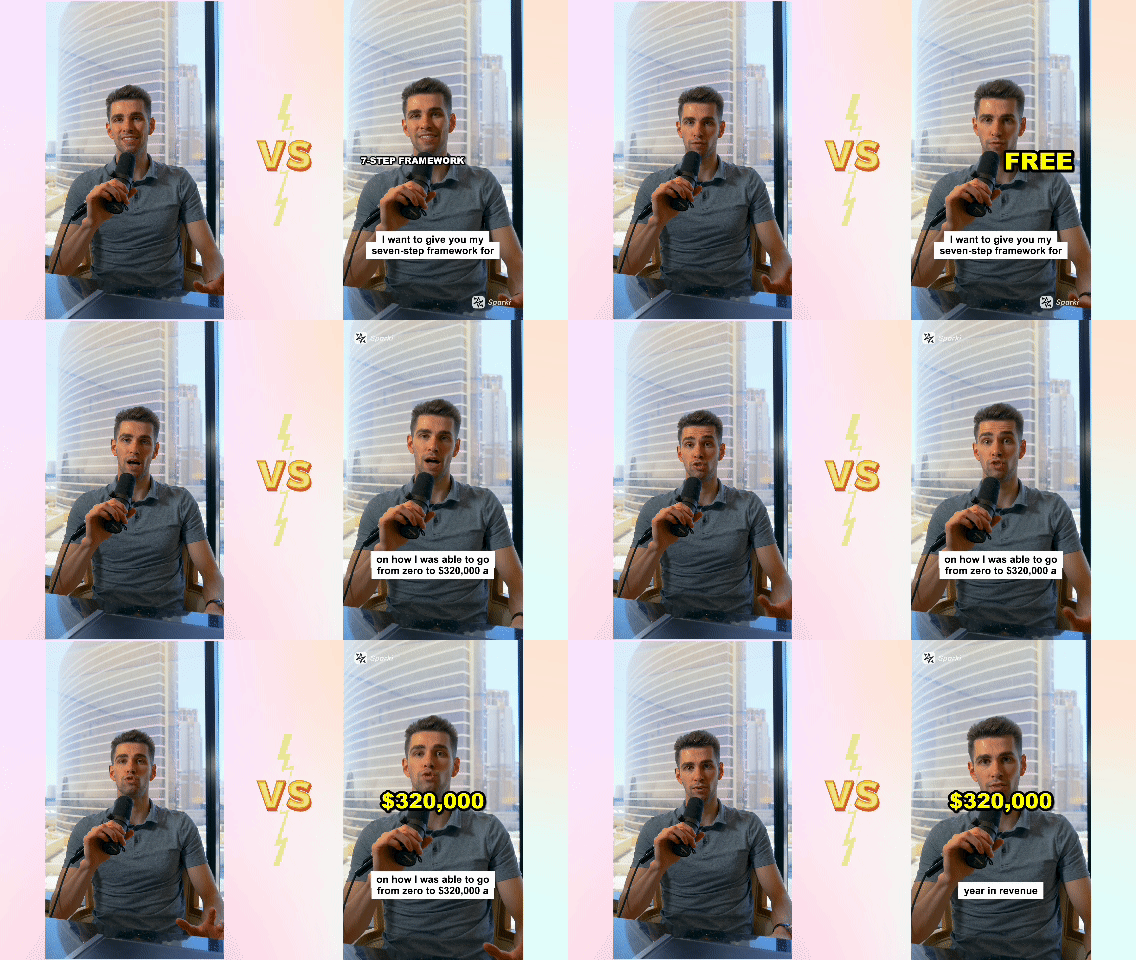
The left side is untouched raw commentary footage. The right side is the result after the first-pass edit — dialogue cleanup, context-aware zooms, automatic accent text, and pacing adjustments — with the manual timeline untouched.
3. Find the argument beats
Commentary is an argument, so the cut points should follow the argument rather than the clock. Brief the structure in the same terms you would outline the script — context, requirements, framework, outcome — and the draft orders what survived cleanup around that spine instead of cutting sentence by sentence. In a talking-head edit, the beats mostly govern pacing and where the frame changes; in a story-driven edit, they govern which visual carries each paragraph.
4. Match B-roll to meaning
This is where the semantic hunt changes shape. Instead of searching by file name, the agent matches meaning against your uploaded library: when the narration turns to economic downturn, a good match is the closed storefront in your own footage — not economy-final-v2.mp4 and not a generic stock clip.
Two honest limits. First, the match is probabilistic: multimodal understanding reads visual mood well but not perfectly, so expect to veto some picks and ask for alternatives. Second, the agent can only select from what you uploaded — if the library has no shot for a claim, no agent invents one; generating missing footage is a different product category entirely. The mechanics of steering B-roll suggestions — reviewing rather than hunting — are unpacked in automatically adding B-roll to talking-head videos.
The brief decides how B-roll is used. In a story-driven edit, B-roll becomes the primary layer and the talking head returns only as an anchor or transition. In a talking-head edit, the default is to stay on the speaker; cutaways appear when they serve the argument, not as decoration.
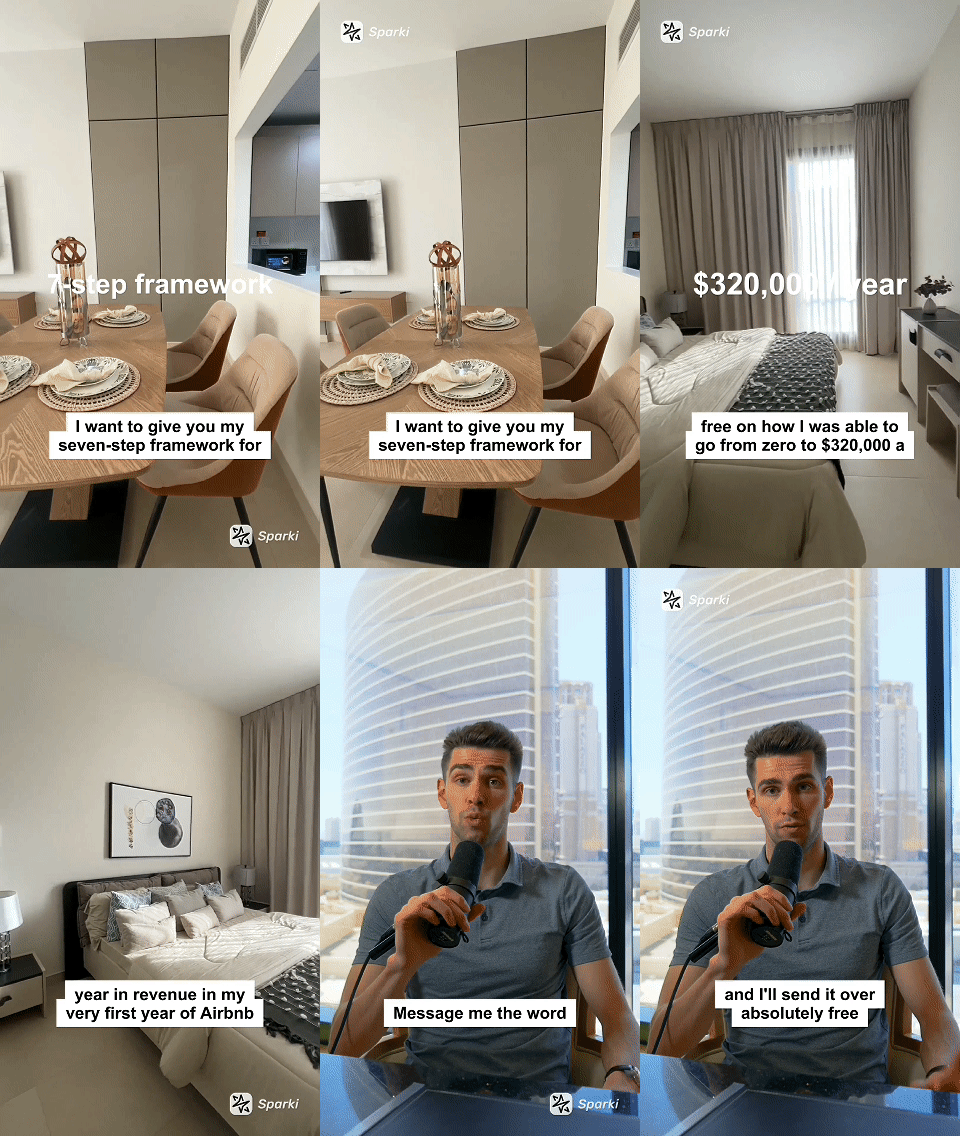
The editing agent decides when to stay on the talking head and when to introduce B-roll, based on narrative context and viewer attention. Visuals are selected from the creator's uploaded assets so the right footage appears at the right moment — and each pick is something you can confirm or override.
5. Captions and accent text
Captions are aligned automatically as a draft; on accented or fast speech, accuracy is worth a read-through rather than an assumption. The design choice that separates commentary from karaoke is that accent text is semantic, not subtitle-driven. The full transcript does not pop on screen — only the load-bearing moments do: the number, the framework step, the call to action. "And then" does not need pixels.
6. Pacing and restraint
Good commentary pacing is mostly restraint. The first draft places change — a cut, a subtle punch-in zoom, a text accent — where the argument shifts intensity, not on a fixed timer. Zoom is a pacing tool, not decoration. Color grading aims for global consistency between A-roll and B-roll rather than aggressive filters. Nothing fights for attention, which is what makes an edit read as finished rather than templated.
Whether the draft actually breathes at the right moments is taste, and taste is yours — which is the next pass.
7. Review what only you can judge
Every pass above produced a draft, and the loop's last mile belongs to you: does the hook match the promise, does the pacing breathe, is the B-roll saying what the sentence says, are the captions accurate on names and numbers. What you are no longer doing is the janitorial work — it happened before your review, consistently, instead of competing with your judgment for the same energy.
Directing the Draft: Chat Versus Timeline
The biggest shift in this workflow is not the output. It is the responsibility. The agent takes the assembly by default — cleanup, cuts, zoom logic, visual emphasis — and your input moves up a level, from operations to direction.
Two everyday tasks make the contrast concrete:
Task: fixing the intro. Timeline way: unlink audio and video, drag-select, ripple-delete, drag the remaining clips back to the start. Chat way: "The intro feels too slow. Cut the first 30 seconds and open directly with the hook about revenue."
Task: covering a section with B-roll. Timeline way: open the file browser, search, preview, import, drag to the V2 track, resize, color-correct. Chat way: "Cover the section about urban decay with my drone footage from Chicago."
Notice what did not disappear: the decisions. What moved is who executes them and when — you state the intent, the agent performs the operations, you judge the result and iterate. That is the difference between a tool you operate and an agent you direct, and it is the same shift traced at paradigm level in the rise of vibe video editing, applied here to footage you already shot rather than to generated video.
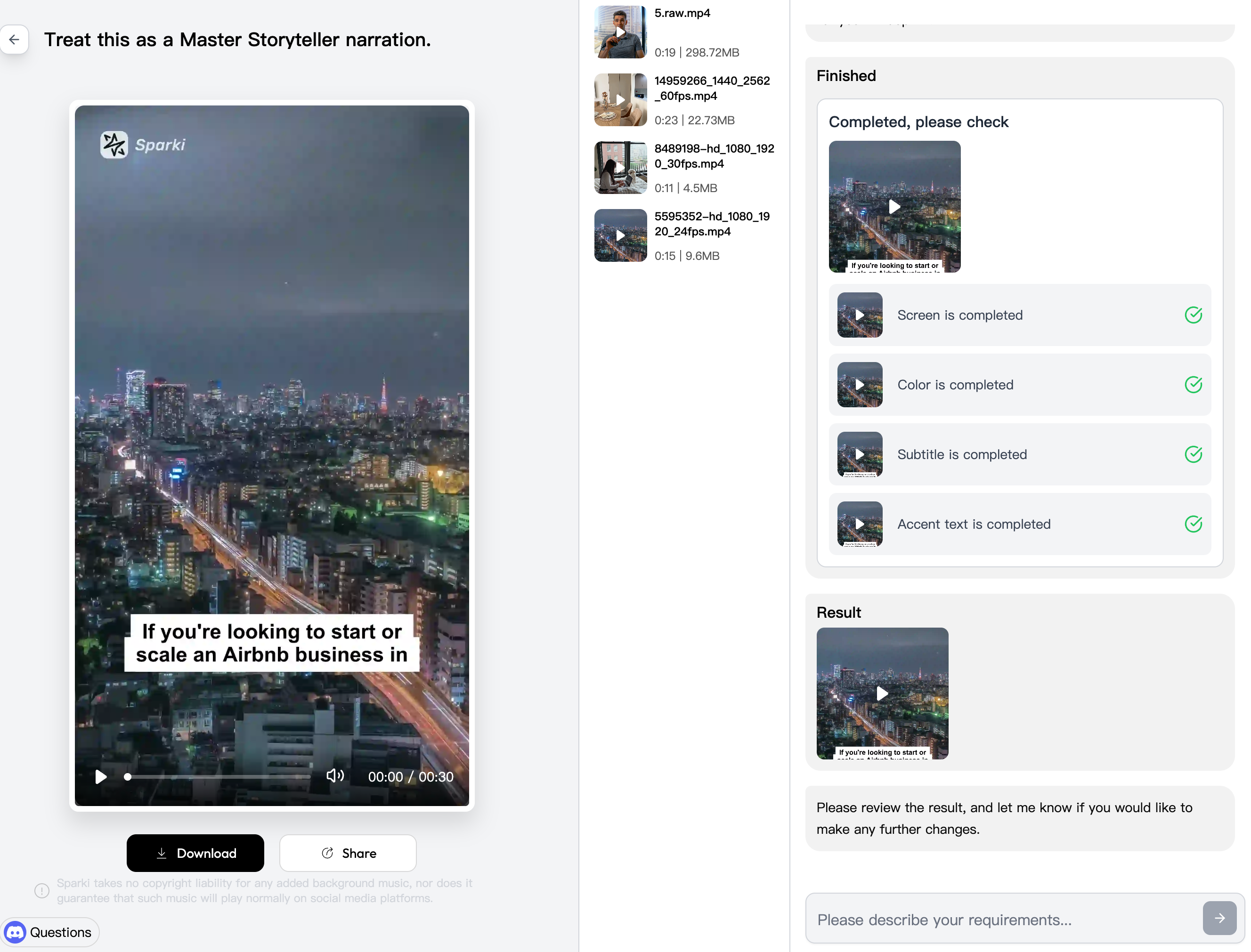
The chat-to-edit interface handles color grading, aspect-ratio adaptation, captions, pacing, and visual emphasis as part of the first pass. Any detail can then be refined through plain text instructions, with no manual timeline work in between.
The same contrast across the whole job:
| Task | Timeline editing (manual) | Chat-to-edit (agent draft) |
|---|---|---|
| Rough cut | 2–3 hours of culling by hand | First-pass assembly from the ingest analysis, for your review |
| B-roll search | File-name search, preview, import | Semantic matching within your uploaded library, then your verification |
| Pacing | Manual keyframes for every zoom | Change placed at argument shifts; you judge whether it breathes |
| Captions | Type or fix by hand | Auto-aligned draft with semantic accents, checked in review |
| Your role | The operator (executing operations) | The director (making decisions) |
Trying It in Two Minutes
If you want to test whether briefing fits the way you think, the experiment is small:
- Upload a talking-head commentary and brief it as a talking-head edit: the speaker stays the anchor.
- Upload a story-driven piece — voice plus a B-roll library — and brief it as story-driven: the visuals carry the narrative.
- In both, one instruction does a lot of work: "Enhance the pacing without changing the spoken content."
Then judge the drafts the way you would judge a junior editor's first pass: did the cuts land where you would have cut, did anything feel robotic, did the B-roll match the meaning. One loop like that tells you more about whether conversational editing fits you than any feature list.
https://sparki.io/blog/chat-to-edit-commentary-video-editing