
Instagram Reels Specs and a Chat-to-Edit Workflow That Skips the Grunt Work
The current Reels specs for Instagram, Facebook, TikTok, and Shorts — length, ratio, resolution, safe zones — checked as of October 2026, plus a Chat-to-Edit workflow where an agent handles the mechanical first pass and you review a draft instead of scrubbing a timeline.

Making Reels is two jobs stacked on top of each other. The first is factual: know the current length limits, aspect ratio, resolution, and safe zones for every platform you post to — and know them again next quarter, because they drift quietly. The second is mechanical: cull the bad takes, cut the dead air, sync the captions, reframe the horizontal footage to vertical, then repeat for the next clip. Editors have a rule of thumb for the second job, the Rule of 60: every minute of finished video costs roughly an hour of this kind of janitorial work. It is folklore rather than measurement, and your ratio may well be kinder, but anyone who has exported a 30-second Reel at midnight recognizes the shape of the curve.
This guide handles the two jobs in order. The first half is a specs cheat sheet for Instagram and Facebook Reels, YouTube Shorts, and TikTok, checked as of October 2026. The second half is about the other approach to the mechanical work: instead of doing it faster, hand it to an AI video editor that works from a plain-language brief — you describe the edit, the agent assembles a first draft, and your attention goes to the judgment calls. If your question is narrower than a workflow — specifically how to convert existing footage between aspect ratios — that operation has its own guide in resizing video for Shorts, Reels, and TikTok; this article covers the Reels workflow end to end.
Reels Specs: Length, Ratio, and Resolution (as of October 2026)
The specs are stable in shape and restless in detail. Vertical 9:16 has been the standard across every short-form feed for years, but the length limits keep moving: YouTube lifted Shorts from 60 seconds to 3 minutes in October 2024, Instagram extended Reels from 90 seconds to 3 minutes in January 2025, and Facebook folded its regular video tab into Reels in mid-2025. Every number below was re-verified in October 2026. Treat the table as a snapshot with a date on it, not a permanent fact.
| Platform | Max length (most accounts) | Aspect ratio | Recommended resolution | Typical frame rate |
|---|---|---|---|---|
| Instagram Reels | 3 minutes; video uploads under 15 minutes are shared as Reels | 9:16 | 1080 × 1920 px | 30 fps (60 fps for fast motion) |
| Facebook Reels | No fixed cap since the June 2025 video merge; ~3 minutes is the common guideline, and only clips of 90 seconds or less can be boosted | 9:16 | 1080 × 1920 px | 30 fps |
| YouTube Shorts | 3 minutes (since October 2024); square or vertical qualifies | 9:16 | 1080 × 1920 px | 30 fps |
| TikTok | 10 minutes recorded in-app; up to 60 minutes uploaded from device or web | 9:16 | 1080 × 1920 px | 30 fps |
Three implications carry most of the practical weight. Work in vertical 9:16 at 1080 × 1920 from the first edit onward, because uploading landscape footage with black bars is the most common formatting mistake and the most avoidable one. Keep faces and on-screen text inside the safe zone — roughly the central 1010 × 1280 pixels — since captions, buttons, and usernames overlay the top and bottom edges of the player. And export at 30 fps by default, stepping up to 60 fps only when the source footage has fast motion worth preserving.
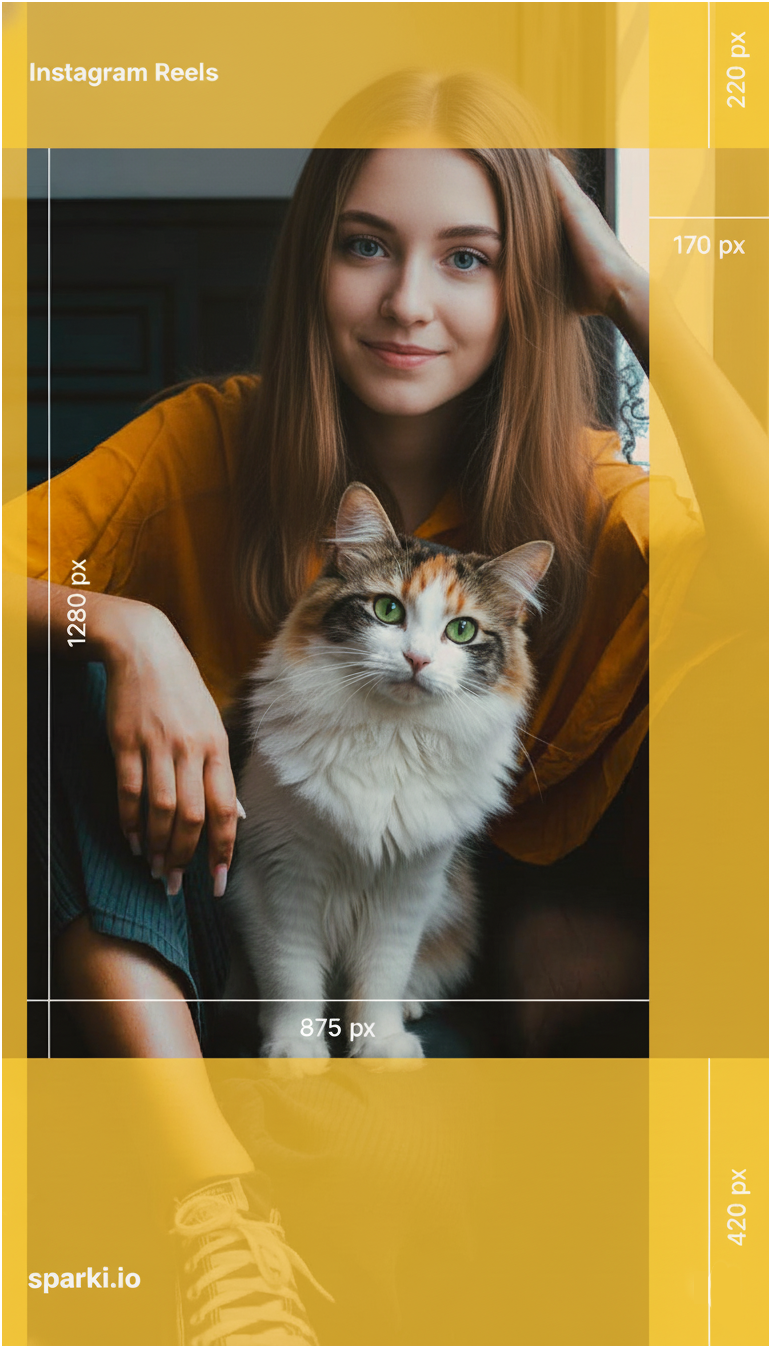
TikTok safe zone guide showing where to place faces, text, and UI-safe content in vertical videos.
You can hold all of this in your head and check every export against it, or you can configure the constraints once and let software enforce them. The rest of this article is about the second path: what changes in the editing workflow when the specs stop being something you remember and start being something the tool applies.
The Chat-to-Edit Workflow for Reels
To make the workflow concrete, take a common scenario. You have just recorded a 60-minute podcast episode or a long vlog, and you know it should become several clips for Instagram, TikTok, and Shorts — but scrubbing through it with a timeline tool feels disproportionate to the outcome. Chat-to-Edit treats editing as a conversation instead: you brief, the agent assembles, you review. Sparki, the product we build, works this way — we are one implementation of the pattern, not a neutral judge of it, and the steps below describe our workflow specifically.
Step 1: Multimodal Ingest
Upload the full 60 minutes. The first pass is a multimodal analysis — it reads the picture and the sound together rather than working from a transcript alone. It registers what is happening on screen, hears laughter and emphasis in the delivery, and flags moments that could open a clip, such as a line like "we doubled revenue by changing one sentence." What comes back is not a blank timeline but a structured outline of your material, ready for direction. What this kind of analysis can and cannot reliably catch is covered in how AI editors understand your footage; the model-level view — what a model like Gemini 3 Pro changes for editing agents — is a separate discussion.
Step 2: The Brief
Now you describe the edit the way you would brief a junior editor, in plain language: extract the section on UGC strategy and make it a standalone Short; find the funniest reaction moments and compile them into a highlight reel. This replaces the edit decision list. You are not cutting one Reel — you are setting up a repurposing pass that turns a single long asset into five to fifteen clips, where each additional clip costs a sentence of direction rather than an afternoon of dragging.
Step 3: First-Pass Assembly
The mechanical work happens here, before your review rather than during it. The agent culls dead air, filler words, and awkward pauses while keeping the pacing from feeling robotic; it orders what remains for clarity, hook to context to payoff; it reframes the footage to 9:16, keeping the speaker positioned away from the UI overlays; and it burns in captions matched to your style so the clip is watchable on mute. The result at this stage is deliberately a rough cut — a first draft to review, not a finished piece — which is what the next step is for.
Step 4: Conversational Revision
Most automated tools end at "take it or leave it." Here the refinement loop is the workflow: you text feedback — the second Reel feels rushed, tighten the pacing without touching the spoken content; open with the joke about the marketing budget instead of the aggressive claim; cover that jump cut with the skyline B-roll — and the edit regenerates while the rest of the structure holds. You stay on clarity, positioning, and tone. The keyframes stay the machine's problem.
Step 5: Export for Every Platform
The final step is exporting clean master files: 1080 × 1920 in 9:16, with the caveat that output resolution follows the resolution of the source footage you uploaded. The masters carry no platform watermark, so the same clean file can go to Reels, TikTok, and Shorts. What you have at the end is a stack of drafts worth reviewing — not, honestly, a finished week of content. The next section is what makes them yours.
What the Agent Handles in the First Pass
The value of the workflow is not only the hours saved; it is that mechanical decisions get made against consistent criteria instead of your declining energy. A tired human settles for the second-best hook, because scrubbing the raw footage one more time costs more willpower than the improvement seems worth. An agent does not get tired at clip seven. Here is what the first pass covers.
The Two-Second Hook
TikTok's Marketing Science team has reported that roughly half of an ad's cumulative impact is delivered within the first two seconds of viewing. That finding is about ads specifically, not organic Reels, but it lines up with what every short-form retention curve shows: the scroll decision is made at the opening. The ingest pass surfaces high-energy moments, emotional peaks, and strong claims, and one of them leads the clip — so the opener is the strongest sentence, not the thirty seconds of throat-clearing that preceded it in the recording.
Micro-Pacing
The failure mode of automated editing is compression: remove every gap and the speech stops sounding like speech. The assembly pass removes fillers and dead air but keeps natural breaths, and it places punch-in zooms at semantic turning points — where the argument shifts intensity — rather than on a fixed timer. The result aims for tight but not frantic; whether it landed is one of the things you check in review. The pacing philosophy is unpacked further in chat-to-edit commentary editing.
Framing and Safe Zones
Instead of downloading a safe-zone PNG and checking every clip against it, the reframing happens at render time: faces and key actions are tracked and kept inside the UI-safe area as the 9:16 version is built, and when a speaker moves, the frame follows where the tracking holds. The honest phrasing is that this reduces framing misses — it does not make them impossible, which is exactly why the checklist below still asks you to glance at face position. For the geometry itself, the safe-zone diagram earlier in this article is the reference.
Length Variants
Instagram now allows three minutes, but the working sweet spot for educational Reels is often much shorter — 15 to 30 seconds — and different platforms reward different durations for the same material. Editing a 15-second and a 45-second version of the same clip used to mean two separate manual edits. In this workflow, duration is part of the brief, like content: ask for a 15-second punchy cut for TikTok and a 45-second version for Shorts, and the agent restructures to fit. Length testing becomes a re-brief instead of a re-edit.
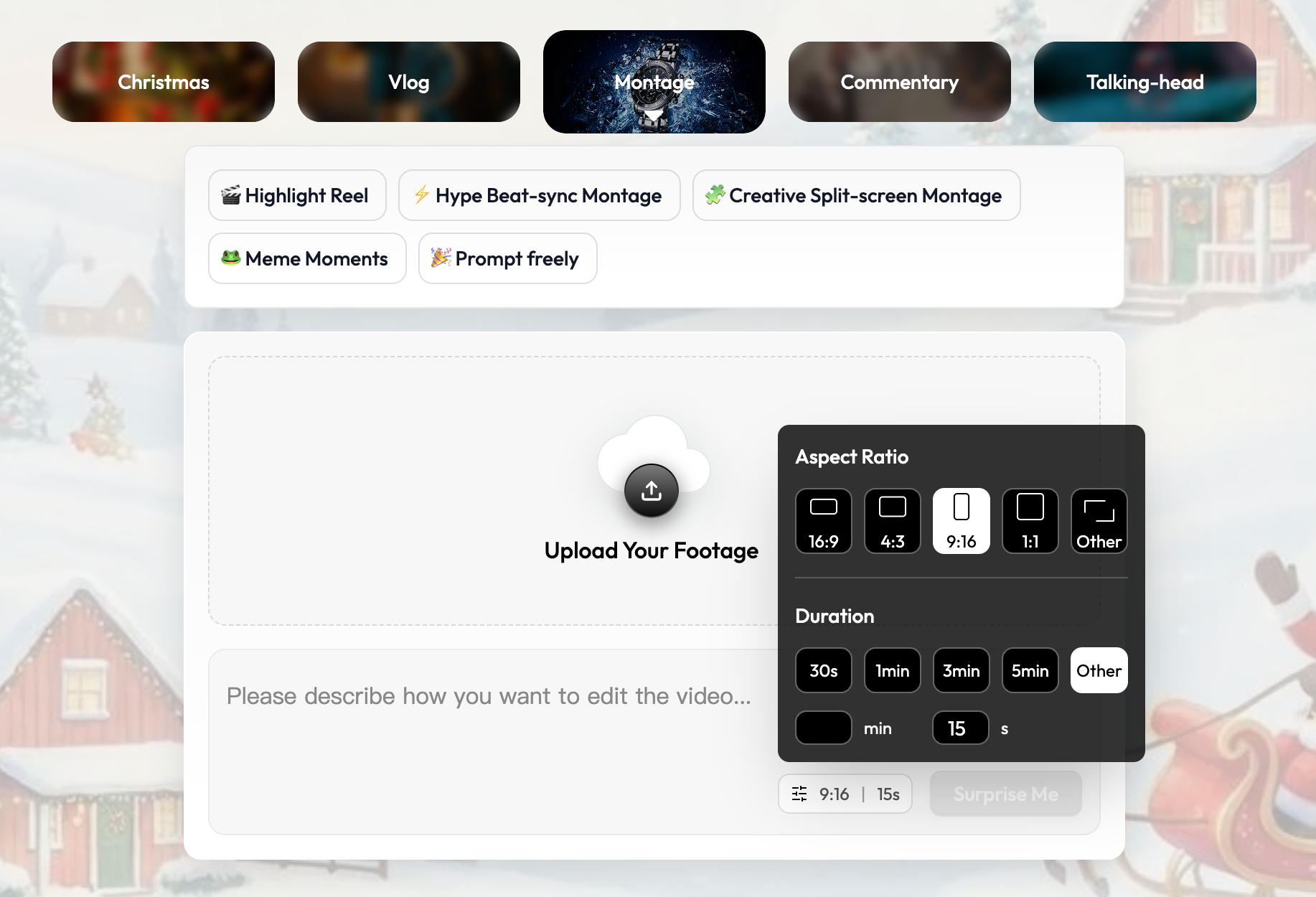
Sparki's montage settings let you pick the aspect ratio (16:9, 4:3, 9:16, or custom) and the duration (30 seconds up to 5 minutes, or custom) before the edit runs, so format decisions live in the brief instead of the re-edit.
Why Manual Editing Breaks Down on Short-Form
Short-form concentrates the editorial load instead of diluting it. Every second has to earn its place, the hook has to land immediately, and the same format rules apply to every clip — which is why a manual-only workflow fails in predictable ways: you settle for a weak opener because you are too tired to scrub again; you spend the session cleaning fillers and syncing audio, leaving nothing for story; you upload the horizontal cut because reframing it and checking safe zones by hand takes an evening; you skip captions because typing them feels disproportionate, and the clip dies on mute. None of these are discipline failures. They are what happens when one person is asked to be both the operator who executes the mechanical steps and the director who judges the result — two jobs with different energies, forced into a single session.
The fix is to split the roles rather than to try harder. The agent becomes the operator: it executes culling, framing, captioning, and formatting to spec, for every clip, at any hour. You become the director: you judge whether the hook matches the promise, whether the pacing breathes, whether the ending earns the loop. For a systematic map of which editing decisions hand over well and which should stay with a human, see what AI video editors can automate.
A Pre-Export Checklist
Before you publish, run the draft through two layers. The first checks what the agent should have handled:
- The hook: does the clip open on the strongest claim or moment the material contains, not the setup for it?
- Dead air: are fillers, awkward pauses, and silence gaps gone without the pacing turning robotic?
- Rhythm: is there a visual change — a cut, a zoom, a caption pop — every few seconds to reset attention?
- Mobile safety: are faces and key text centered and clear of the Reels and TikTok UI zones?
- Captions: are they synced to the audio and legible on a small screen?
The second layer is what only you can judge, and it is short:
- Does the video deliver on the promise made in the first second?
- Is the ending tight enough that the loop feels intentional rather than abrupt?
- Is this the version of the idea you would stop scrolling for?
If the first layer holds, the second takes minutes. That is the honest version of breaking the Rule of 60: the mechanical work does not disappear — it happens before your review, consistently, instead of competing with your judgment for the same energy.
https://sparki.io/blog/ai-reels-editing-2025