
Best AI Video Editors for TikTok: Tools That Actually Re-Edit for 9:16
Compare the best AI video editors for TikTok in 2026. Learn how tools like CapCut, OpusClip, Descript, and Sparki handle 9:16 reframing, captions, and short-form editing workflows.

TikTok editing is no longer a format conversion problem.
Exporting a vertical file does not fix framing drift, captions that collide with the interface, or openings that lose attention in the first seconds. Most creators discover this the hard way: a video that looks fine in the editor underperforms in the feed.
For TikTok specifically, the real distinction is not converter vs editor , but whether a tool can re-edit footage for 9:16 viewing :
-
keeping the subject readable when people move
-
protecting on-screen text or slides
-
placing captions inside TikTok’s UI safe zone
-
tightening the first seconds for scroll behavior
This guide compares the main AI video editing approaches for TikTok workflows , explains where each type fits, and shows when an AI re-editing workflow becomes more useful than a simple resize.
Quick Comparison: Which TikTok Editing Tool Fits Which Workflow?
| Tool / Category | Best For | Where It Breaks for TikTok | TikTok Fit |
|---|---|---|---|
| CapCut | Hands-on editing, templates, trends | Requires manual framing and caption placement | Good for manual creators |
| OpusClip / Vizard | Extracting highlights from long videos | Less control over composition and layout polish | Good for quick clipping |
| Descript / Gling | Speech cleanup and transcript editing | Not optimized for TikTok layout and reframing | Best for talking-head editing |
| Sparki | AI re-editing long videos into vertical clips | Overkill if you only need a resize | Best for TikTok-native workflows |
If your footage is already framed vertically and only needs exporting, a converter or simple editor works.
If the video was originally shot 16:9 or long-form , the editing problem becomes a reconstruction problem : framing, captions, pacing, and readability must be rebuilt for the feed.
What TikTok Editing Actually Requires
The constraints of TikTok editing differ from general video editing.
Three factors determine whether a clip survives the feed.
1. 9:16 Reframing (Not Center Cropping)
A center crop often fails when the subject moves or when multiple speakers appear.
Good TikTok editing requires:
-
tracking faces or hands
-
protecting slides or on-screen text
-
keeping composition readable during motion
For a deeper explanation of resizing approaches—crop, blur background, or subject-aware reframing—see:
→How to Resize Video for Shorts, Reels, and TikTok
2. Captions Must Survive the UI
Captions often collide with TikTok interface elements:
-
right-side reaction buttons
-
bottom description area
-
engagement overlays
Effective captions need:
-
safe-zone positioning
-
short line lengths
-
strong contrast for phone viewing
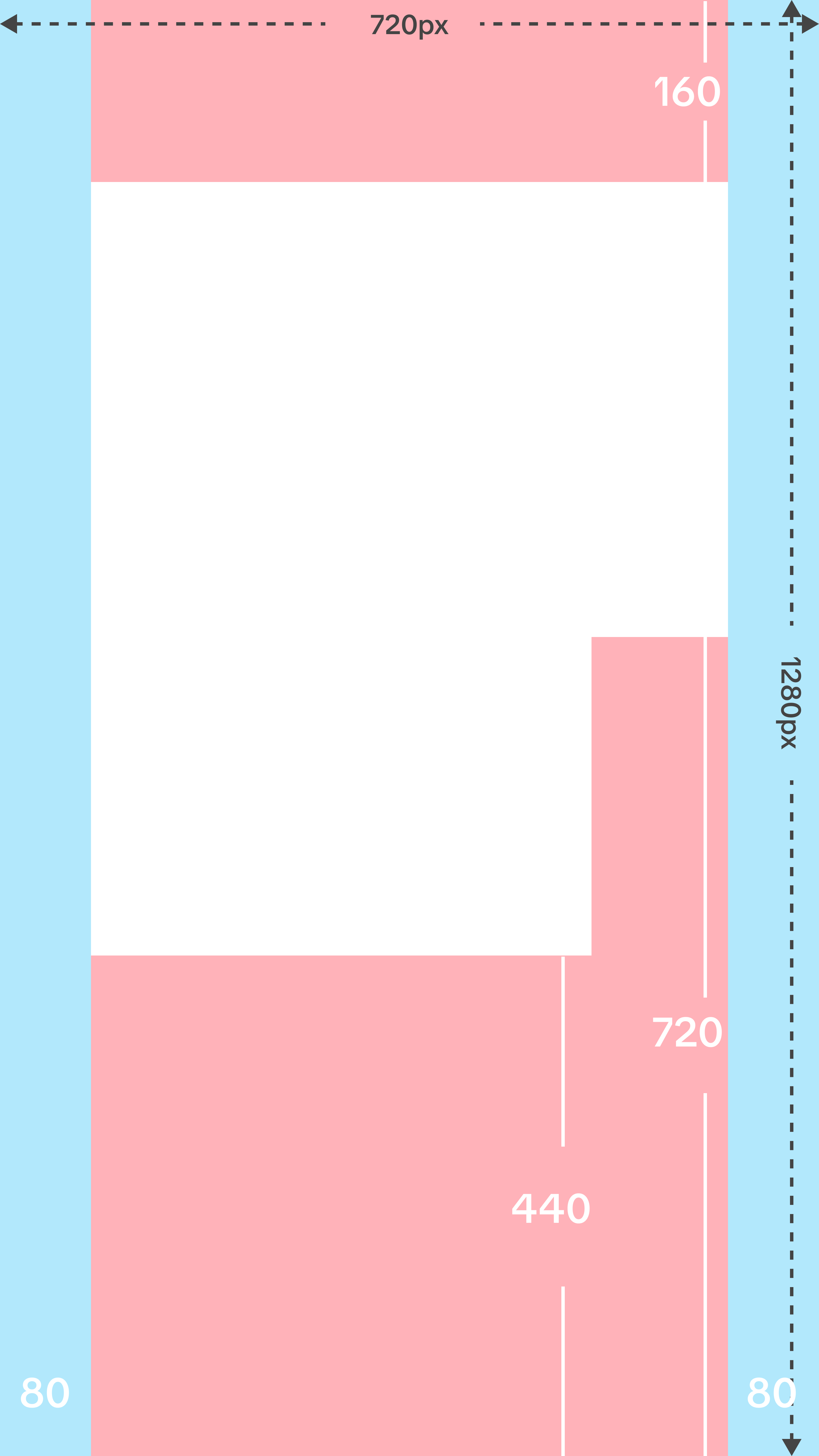
Safe area for captions and UI in TikTok videos
If your main concern is subtitle accuracy or segmentation quality, this guide compares the main caption tools:
→CapCut Auto Captions Alternatives
3. The First Seconds Determine Retention
TikTok discovery heavily depends on early retention.
Editing decisions in the first 2–6 seconds matter more than perfect finishing.
Typical improvements include:
-
removing long pauses
-
punch-in reframing
-
highlighting key phrases
-
starting closer to the core idea
If your workflow starts from long YouTube videos or podcasts, the broader repurposing workflow is covered here:
→How to Convert Long Video to Short Video
Best AI Video Editors for TikTok Workflows
Different editors solve different parts of the editing pipeline.
CapCut
CapCut is the most common starting point for TikTok creators.
Strengths:
-
mobile-first editing
-
large template ecosystem
-
trend effects and quick styling
Limitations:
-
framing adjustments are manual
-
captions require checking against safe zones
-
scaling long-form repurposing can be slow
CapCut works well for creators who edit directly on mobile and want maximum visual control.
OpusClip / Vizard
Highlight-extraction tools focus on finding the most engaging moments in long videos.
They typically:
-
detect speech highlights
-
cut clips automatically
-
generate captions
These tools are effective when the goal is speed of clipping , but they may still require layout adjustments before publishing to TikTok.
A deeper comparison between highlight-based editing and full re-editing workflows is here:
→OpusClip Alternatives: Subtractive vs Additive Editing
Descript / Gling
Transcript-driven editors optimize for talking-head cleanup.
They help with:
-
removing filler words
-
tightening dialogue
-
editing video through text
However, they are less focused on platform-specific layout issues like vertical reframing or TikTok UI safe zones.
A deeper breakdown of transcript-based workflows is here:
Sparki
Sparki focuses on AI re-editing workflows rather than timeline manipulation.
Instead of only resizing footage, the system analyzes the video to:
-
reframe the subject for 9:16
-
generate captions positioned for safe zones
-
detect engaging segments
-
tighten pacing automatically
This approach works especially well when turning long-form videos into multiple TikTok clips.
Why Converters Still Fail on TikTok
Converters solve only one problem: aspect ratio.
But most TikTok failures happen elsewhere.
Typical issues include:
-
faces leaving the frame during center crops
-
captions overlapping the UI
-
slides or code getting cut off
-
openings that take too long to reach the point
The problem is not the container format.
It is that the edit was never rebuilt for the platform.
The TikTok Workflow I Use With an AI Editor
When repurposing a long video into multiple TikTok clips, the workflow typically looks like this.
1. Identify the clip candidates
Start with segments where a complete idea appears within 15–30 seconds.
2. Reframe for vertical composition
The subject should remain readable throughout the clip.
3. Generate captions inside the safe zone
Captions should remain visible above the description panel.
4. Tighten pacing
Remove long pauses and shorten transitions.
5. Export for 9:16
Standard export settings:
-
resolution: 1080×1920
-
captions: burned-in or sidecar
TikTok Export Specs That Still Matter
Even with AI editing, a few export rules remain important.
-
Aspect ratio: 9:16 vertical format.
-
Resolution: 1080×1920 remains the safest standard.
-
Frame rate: Match the source footage when possible to avoid artifacts.
-
Captions: Keep captions inside the safe zone to prevent UI collisions.
https://sparki.io/blog/tiktok-ai-video-editor